Permissions on the NQDC
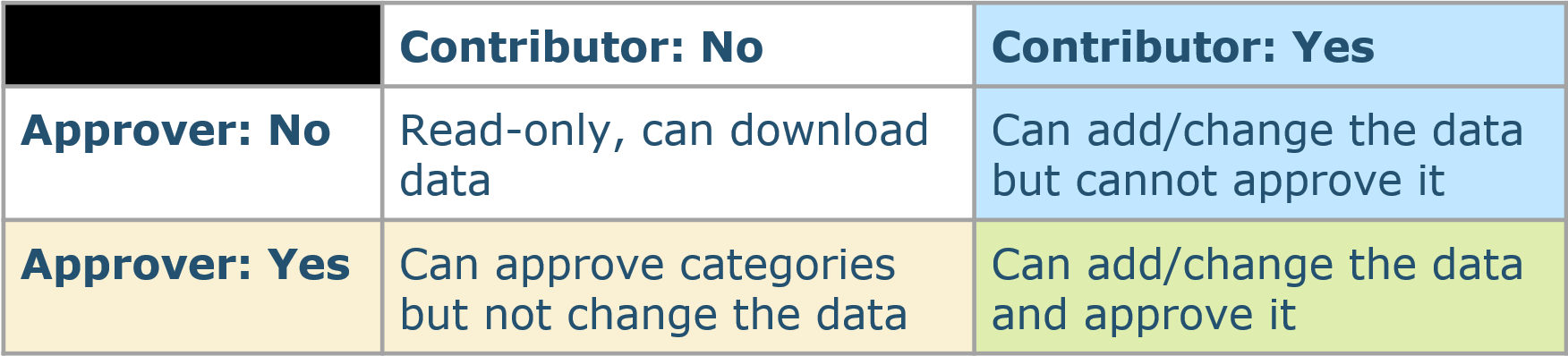
There are two permission sets available for the NQDC application. These are Contributor and Approver. You can have both permission or neither, for read only access. The action available to each permission set are as follows:
Contributor
- Update data via Data Upload
- Update data via Data Entry
- Close or Re-open entries via Data Entry
Approver
- Approve a category
- Approve all categories
Some functionality is available regardless of permission set:
- Download your data
- Use the Data Review page to check for missing values, though you won't be able to Approve the data with out Approver permissions
- Upload a file to check for data qualities issues, though you won't be able to use the Update button without Contributor permissions
- Explore the application, though without Contributor permissions you won't be able to view the input fields
To update your permissions, please email HINinformatics@HealthInnovationEast.co.uk with an updated NQDC User Account Request Form, available from the Teams channel.
Summary of permissions